
Verify the source
Confirm the browser domain and install source; do not trust unsolicited messages or ad links.
Download and set up with care🔐 Digital wallet · Security by design
Make sense of wallets, keys and networks in one thoughtful experience. Start with a safe setup, preserve your recovery phrase, and review each transaction before signing.
Keep credentials under your control
Back up before managing funds
Verify chain and destination
Never disclose recovery words
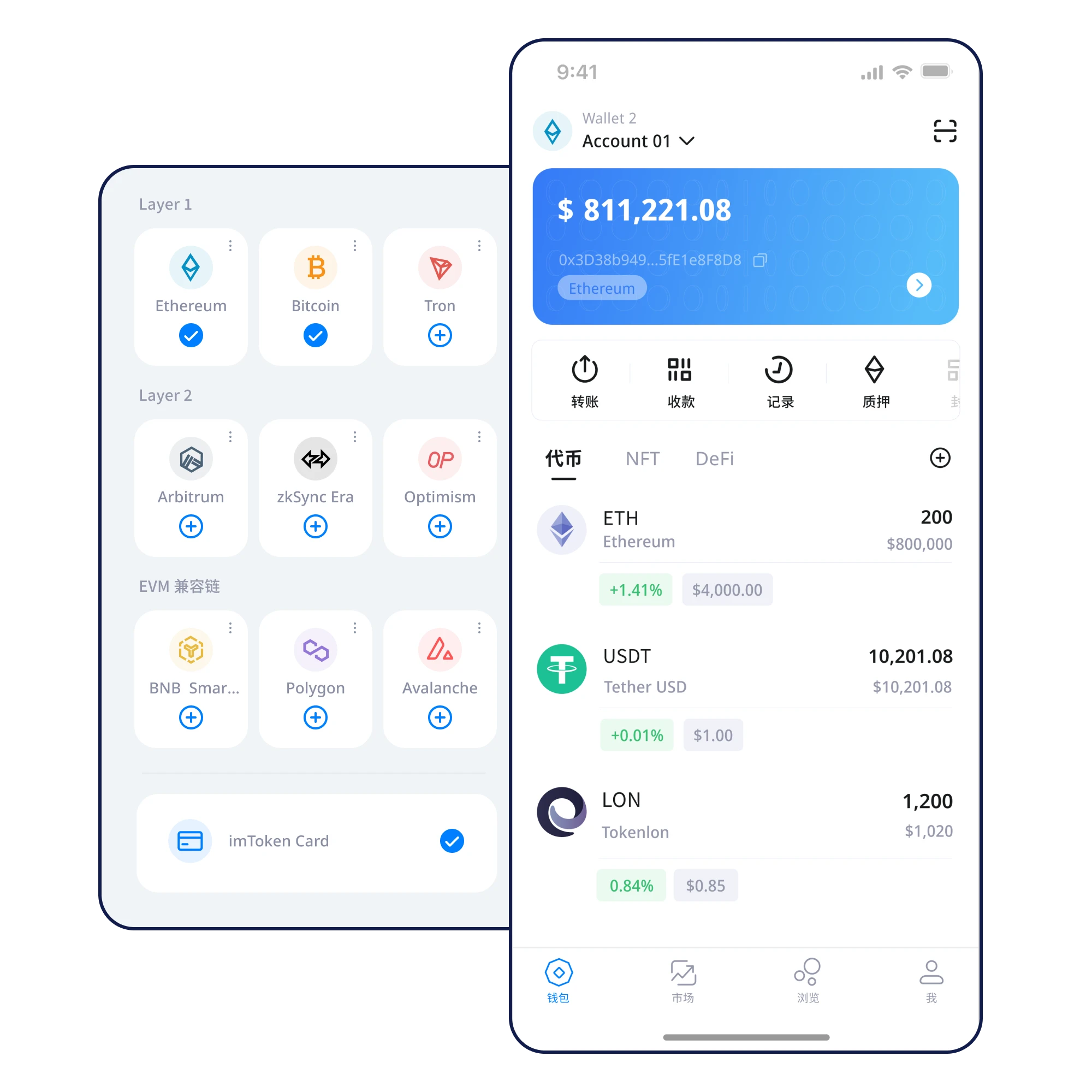
Total assets (example)
$12,480.00Interface & assets
Read chains, token names and pending actions in context. The values shown are design examples, not actual account data or live market prices.
 Make sense of multi-chain assets
 A concrete check accompanies every action.
Confirm the browser domain and install source; do not trust unsolicited messages or ad links.
Download and set up with careKnow the difference between creating and importing a wallet on a trusted device.
Creating your first walletWrite recovery words in order. Keep them away from photos, cloud storage and chat apps.
Your first recovery backupVerify every word and its order offline, considering both loss and unauthorized access.
Recover access from a verified backupMatch each asset to the intended network and token contract before adding it.
Make sense of multi-chain assetsVerify network, destination, amount and approval scope before signing.
A pre-transfer review that mattersKnow where your keys live and safeguard the recovery path.
What local key management means
Make device changes predictable with a tested recovery plan.
Recover access from a verified backup
Know the chain, destination, amount and approval scope before signing.
Risk alerts should inform decisions
Know who controls your credentials.
Review before each signature.
Keep a usable backup before you need it.
Explore the guides
Find the next topic for your current task.
Understand how credentials are created and who can access them. Follow a deliberate setup sequence before you move any funds.
 Creating your first wallet
 A token name can appear on different chains. Understand network selection, token contracts and account views before receiving or sending assets.
Make sense of multi-chain assetsBefore sending, review the recipient address, chain and amount. When appropriate, test with a small transfer rather than trusting a token label.
A pre-transfer review that mattersCheck your backup while your old device still works. Confirm restored addresses on the new device before deciding what to erase.
Move to a new device safelyImpersonation sites, unsolicited support messages and misleading approval prompts can look familiar. Verify sources and signing requests.
Spot phishing before you signRisk review
When a request feels unusual, pause and verify.
FAQ
Build confidence by checking the right details.
Questions worth asking before you beginSelf-custody means the user is responsible for recovery credentials. Confirm the implementation in official product documentation and never hand recovery words to others.
Keys can be stored offline, but reading blockchain data and broadcasting transactions normally require a connection.
Keep all words in the right order, offline and secure. Avoid screenshots, cloud notes, email and support chats.
A private key typically signs for an address. A recovery phrase can restore a set of wallet keys. Both must remain confidential.
Download access
Verify the source before installation, then secure your recovery credentials.
⬇ Download Now